
Observations from Writing an MCP Server that uses Access Control
Adventures in AI Security

The Model Context Protocol is the standardized mechanism that allows AI Agents to interact with services in a consistent and reliable way. There are several published examples to review, as well as SDKs in several popular languages. For obvious reasons, these examples do not support access control.
We decided to implement an MCP Server that would use Policy-Based Access Control to authorize requests coming from a user before acting upon them.
Infrastructure & Preparation
We implemented the MCP Server in Java, using the Spring.IO MCP framework. And we used OPA and Rego to implement a minimal policy package to prove the concept.
We used Claude Desktop as the AI Agent. We had to pay for the $20/month tier to be able to interact with MCPs.
Capabilities
This prototype will allow the user to visit websites, but only the ones authorized by the policy rules, and only if the user provides the appropriate identification. We called this service secure_fetch.
Architecture
To keep it simple, we have a user, Claude Desktop as the AI Agent, a custom-made MCP Server, and a local instance of OPA, running a simple custom Rego policy.
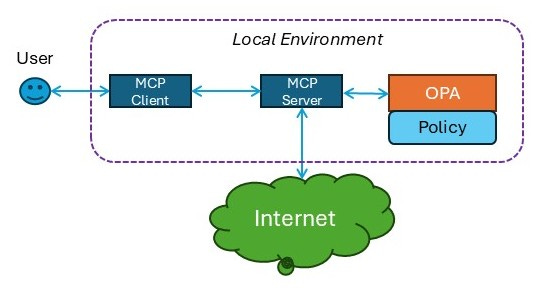
The MCP Client (Claude Desktop) will be made aware of the MCP Server. It will then be possible for the user to ask Claude to use the MCP Server to fetch information from the Internet. The MCP Server will expect some sort of identification token representing the user along with the target URL Before it attempts to access the Internet, it (the MCP Server) will perform an authorization check against OPA. If OPA allows the request, the MCP Server will then use an HTTP GET to acquire the requested URL.
Major Challenges
There were two major challenges involved in this implementation, and then a host of minor challenges. The major challenges were:
Getting Claude Desktop to become aware of the MCP Server
Getting the MCP Server to properly interact with Claude
Awareness
One of the major eye-opening moments in this build was the realization that there a rigorous specification is not required. You don’t provide Claude with schemas or RPC stubs or anything like that. When you write your MCP Server, you must include various natural language details that explain what services are provided by the MCP, and what the parameters are for each of these services.
Specification
Here is the description of our secure_fetch service:
Fetch authorized content on behalf of a specific user from a remote website. If the request is not authorized, we will return 403 Forbidden. If the requested URL does not exist, we will return a 404 Not Found error. If the request fails, we will return a 500 Internal Server Error
To reiterate, this is the “specification” embedded in the MCP Server. Claude will discover this specification at integration time.
We also provided descriptions of the parameters for the secure_fetch service:
@ToolParam(description = "The URL from which you wish to acquire content") String targetUrl@ToolParam(description = "Set this to true if you'd like the content in HTML, false if you'd like it in markdown (default is false)") boolean forceRaw@ToolParam(description = "The identification token providing the identity of the AI agent making the request. The format of this token will be specified by the creator of the AI Agent") String agentToken@ToolParam(description = "The identification token providing the identity of the User for whom this request is being made. The format of this token will be specified by the creator of the AI Agent, and should always be different from the Agent token") String userToken
Could this language be more formal? Without a doubt. For complex services with nuanced parameters, more specificity is probably much better.
Interactions
The simplest way for the MCP Client (Claude Desktop) to interact with the MCP Server is via STDIO/STDOUT. That is, the MCP Server “listens” to stdio, and sends response data to stdout.
This has the benefit of simplicity. On the other hand, you have to take special care to never send any information to stdout, and you can’t be running a web server or anything else that might prevent the MCP Server from listening to stdio.
There are two additional ways that MCP Clients can interact with MCP Servers:
Server-Side Events (SSE)
Websockets
The primary benefit of those other mechanisms is that they can be hosted on remote servers. On the other hand, this adds additional layers of complexity in terms of network architecture and security, especially if the MCP Client is hosted on a user’s desktop or equivalent.
Minor Challenges
In addition to the major challenges, we had several minor issues that added time to the project:
Claude is not really aware of its own configuration
On multiple locations, it gave us the wrong information about the locations of files, the expected locations of log files, etc
Claude is not aware of the details of the MCP Server SDKs
In multiple cases, it provided code samples for services and tools that were clearly not consistent with the Spring IO mechanics. Even though we had specified that we were using Spring IO for this.
This is probably something that will get better over time
The primary way that this integration all happens is via naming, and it was somewhat difficult to make sure all the naming was correct and consistent, because of the “natural language” aspects of the integration
Getting the configuration file just right so that Claude could properly invoke the MCP Server was tricky (again, primarily because Claude doesn’t seem to be fully aware of the details of this configuration)
Pleasant Surprises
Troubleshooting
One of the most interesting aspects of this project was that when we were attempting to get the integration working, Claude would provide additional information in failure cases. It would not just say “failed”, it would examine the response from the MCP Server (or lack thereof) and make suggestions on what might be wrong and where to look next. About 2/3rds of these suggestions were unhelpful or misleading, but the other 1/3rd was helpful and
Conversation
Integrating the MCP Server with Claude has one formal step - adding the appropriate JSON to the config file. The rest of it is basically informal chatting: providing it with requests to test the integration, asking details about what happened during failures, asking for advice on how to avoid logging to stdio, etc.